Fire alarm
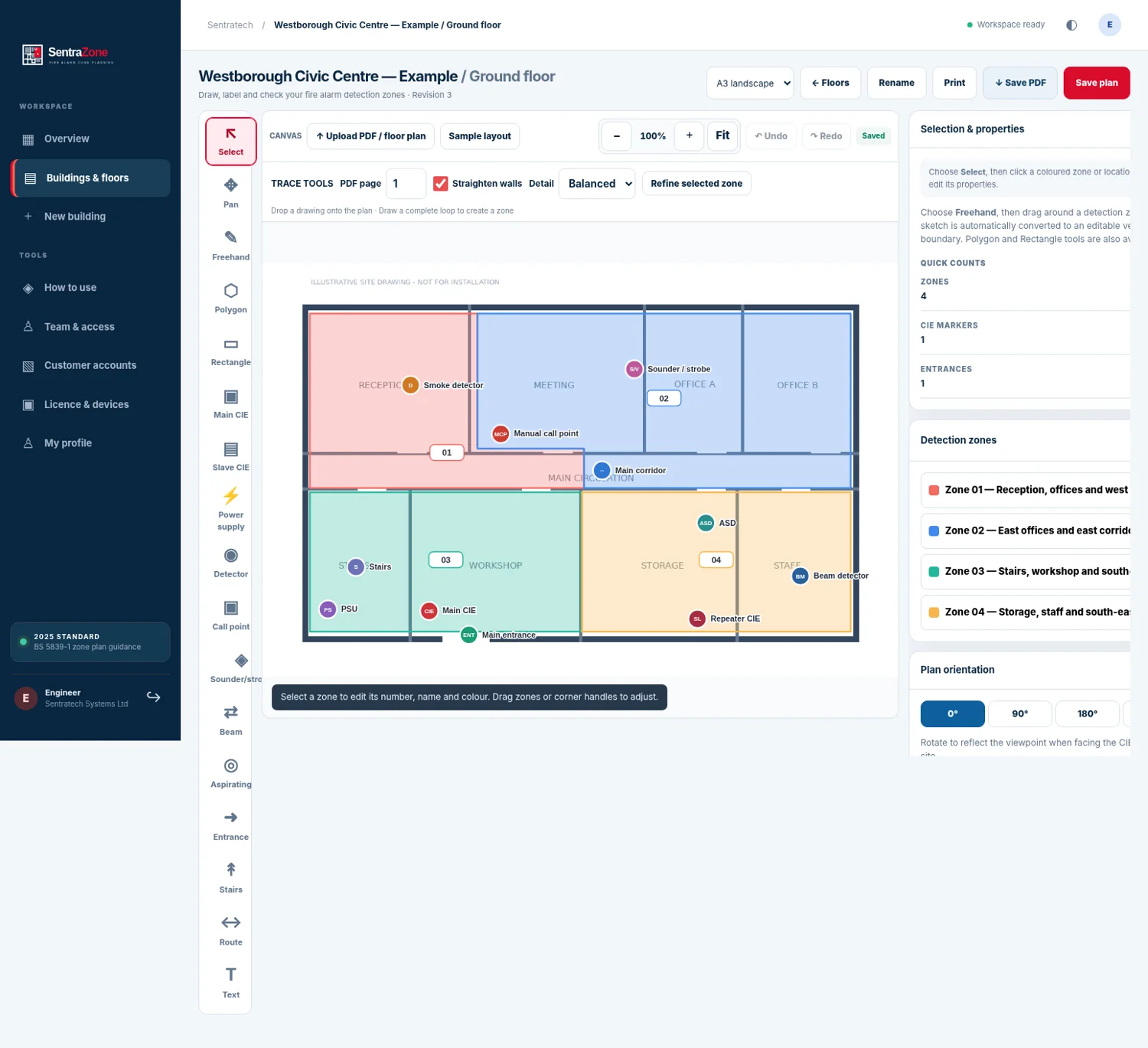
Draw zones, add detection and sounder symbols, locate panels and reference device addresses. Position entrance arrows and beam detectors at precisely the required angle.

Plan fire alarms, intruder alarms, CCTV and access control against the same building drawings. Capture equipment records, document site findings and produce structured handover material from one practical engineering workspace.
 WORKFLOW VIEW
Keep each discipline legible while preserving the relationship to the same real-world building.
Draw zones, add detection and sounder symbols, locate panels and reference device addresses. Position entrance arrows and beam detectors at precisely the required angle.
Record contacts, detectors, alarm panels, areas and partitions against the relevant floor, with device-level manufacturer and circuit information.
Plot cameras with indicative field-of-view overlays, orientation, coverage notes and network identifiers, helping installers explain their intended design.
Document readers, door controllers, locks, exit controls and associated doors, keeping door reference and equipment information together.
Site drawings are only useful when the supporting information can be found, edited and exported.
Keep fire, intruder, CCTV and access control disciplines organised against shared architectural floor backgrounds, without forcing engineers to maintain unrelated drawing files.
Import drawings and use practical cleanup, line enhancement and alignment tools to prepare a legible installation background.
Create fire zones and position device symbols with detailed equipment properties available on demand in a dedicated modal.
Rotate entrance arrows and beam detectors to any angle. Tooltips show identification information without overwhelming the plan.
Navigate a multi-floor building, organise plan revisions and choose the appropriate view for design or review.
Associate equipment details and photographs with placed devices rather than scattering records between folders.
Generate identifiers for asset labels that lead an authorised user to the corresponding equipment record.
Prepare branded drawing PDFs, equipment schedules, verification details, revisions and approval evidence for customer review.
Screenshots from the application development build; functionality and availability should be confirmed at demonstration.


A straightforward sequence for the engineer, reviewer and customer.
Create a building and define its floors
Import and clean the architectural backgrounds
Add discipline-specific symbols, zones, cables and properties
Confirm positions on site and record photographic evidence
Review the plan, record verification and manage revisions
Export drawings and equipment information for customer handover
Examples of how teams can make practical use of the platform.
Develop legible, zone-coloured floor plans with detector and panel references.
Plan camera positions and coverage, intrusion devices and controlled doors in separate, related layers.
Use equipment schedules and QR references to locate installation records during future site work.
The encrypted offline Field Kit, QR-linked equipment records, revision controls and subscription tooling are being tested as part of commercial acceptance. We do not describe physical-device offline performance or payment automation as fully production-approved before UAT.
SentraZone supports professional documentation. It does not automatically confer regulatory compliance, certify a system or replace competent engineering review.
All four installation disciplines in a single device-based subscription. Please enquire for availability, trial arrangements and any organisation-wide requirements.
Plus VAT · Subject to commercial release and UAT
Enquire about SentraZoneFrequently discussed points to clarify before arranging a demonstration.
Yes. Fire alarms, intruder alarms, CCTV and access control are part of the multi-discipline planning model.
An encrypted offline Field Kit has been developed for prepared plans. Physical device relaunch, sync and conflict testing remain part of commercial acceptance; availability depends on the installed version.
The application provides branded PDF drawing workflows and equipment-related exports.
No. Software assists documentation. The designer and competent responsible persons remain accountable for design decisions and applicable standards.
The proposed Professional launch price is £24.95 plus VAT per device per month. A commercial order and billing launch remain subject to UAT.
Each application stands on its own. Integrations can be scoped where they add real operational value.
Tell us about the people, sites, data and workflows involved. We can discuss a practical demonstration and the deployment questions that matter.